| [21:14:20] | <symbioquine[m]> | <mstenta[m]> "Do you mind if I change it to..." <- Any of those sound fine |
| [21:15:24] | <symbioquine[m]> | The inner brackets were used in the classic editorial style - which I recognize can be confusing in a markdown context. |
| [23:37:55] | * paul121[m] has joined #farmos |
| [23:37:56] | <paul121[m]> | <mstenta[m]> "wonder if there's a way to do..." <- If you make a PR on Drupal Gitlab it should spin up a Tugboat. Haven't used that in a while but it should be wired up |
| [01:35:16] | * farmBOT has joined #farmos |
| [05:32:23] | <farmBOT> | @farmOS@fosstodon.org => The #farmOS monthly community call is today at 2pm Eastern. All are welcome! https://farmos.org/community/monthly-call/ => https://fosstodon.org/@farmOS/112404693162214589 |
| [09:46:56] | * samno[m] has joined #farmos |
| [09:58:34] | <samno[m]> | Hello, I'm new to farmos and I'm having difficulties getting it set up. I thought I was good at computers compared to my farming friends but this is a bit above me. I have got ubuntu installed on an old tablet. I struggle to make a lot of sense of the install instructions. I asked chatGPT and did get a fair way through the install, but ended up with a minimal farmos with every link linking to a 404 page. I think I was using the packaged |
| [09:58:34] | <samno[m]> | install rather than docker. Are there some install instructions for noobs that are written with less technical language and don't assume background knowledge in databases? Thanks, Sam |
| [09:59:36] | <mstenta[m]> | Hi samno! Welcome! |
| [10:00:05] | <mstenta[m]> | Can you share a little more details about what you did? |
| [10:01:01] | <mstenta[m]> | > Are there some install instructions for noobs that are written with less technical language and don't assume background knowledge in databases? |
| [10:01:01] | <mstenta[m]> | The tricky thing about this is... you will be managing a database. farmOS doesn't do that for you. So if you aren't comfortable with that, then you're taking on some risks. For example, farmOS does not handle backups for you. You need to know how to do that yourself. |
| [10:01:07] | <samno[m]> | Ill try my best! |
| [10:01:28] | <samno[m]> | I'm keen to learn |
| [10:01:32] | <mstenta[m]> | Self-hosting provides a lot of freedom and flexibility, but it does assume some expertise. |
| [10:01:46] | <mstenta[m]> | The alternative is to use a hosted solution like farmier.com |
| [10:02:02] | <mstenta[m]> | (shameless plug 😄) |
| [10:02:11] | <samno[m]> | To install farmOS on Ubuntu, you can follow these steps:... (full message at <https://matrix.org/_matrix/media/v3/download/matrix.org/lsepIyUbacXsmkWe...) |
| [10:02:54] | <mstenta[m]> | We try to make self-hosting as accessible as possible, but it definitely isn't a "push button process". |
| [10:03:13] | <symbioquine[m]> | First step: Don't use ChatGPT |
| [10:03:18] | <symbioquine[m]> | Start here: https://farmos.org/hosting/ |
| [10:04:05] | <mstenta[m]> | Yea I'd second what symbioquine - ChatGPT makes me super nervous... about providing misleading/wrong instructions. |
| [10:04:16] | <mstenta[m]> | We've seen that a bunch in this community already |
| [10:05:12] | <symbioquine[m]> | The instructions are some vague amalgamation of generic "install this PHP software on a LAMP stack" |
| [10:05:32] | <symbioquine[m]> | * The instructions (from ChatGPT above) are some |
| [10:05:35] | <mstenta[m]> | samno: It helps to understand that farmOS is built on top of Drupal. So you are essentially hosting a Drupal website. There are tons of resources out there for hosting Drupal generally. And we can help you understand what's specifically needed for farmOS. |
| [10:06:39] | <symbioquine[m]> | symbioquine[m]: It might get you close, but that's the least supported way of installing farmOS |
| [10:06:52] | <symbioquine[m]> | (and hardest) |
| [10:08:31] | <samno[m]> | I'm aware of farmier, but it somewhat avoids the point of running your own management system if you arent in control of your data and have to pay. There are several apps where I can pay for farm management software. I think there is an opportunity for something like this now that record keeping is becoming a massive part of farming, but I was just hoping I'd missed something simple with the install and it was a bit simpler |
| [10:09:04] | <samno[m]> | I diodnt want to use chatGPT, i was just looking for some "step 1... step 2..." instreuctions |
| [10:10:25] | <symbioquine[m]> | The problem is that just providing "step 1, step 2, etc" is risky since getting farmOS (or any self-hosted record keeping software) running is only a small piece of the work... |
| [10:11:02] | <symbioquine[m]> | You need to �understand� where your data is going, how it is getting backed up, and how to troubleshoot (at least a little bit) |
| [10:11:06] | <samno[m]> | I started by following farmer eds instrucions, but having spoke to farmer ed via FB, it turns out they were suitable for ubuntu |
| [10:11:10] | <samno[m]> | https://farmer-eds-shed.com/farmos-version-2-raspberry-pi-install/ |
| [10:11:44] | <samno[m]> | werent* |
| [10:12:36] | <mstenta[m]> | If you're using Ubuntu, I would recommend installing Docker and running farmOS and PostgreSQL in Docker containers. |
| [10:12:53] | <mstenta[m]> | We will most likely be dropping support for the "packaged releases" in the future. |
| [10:13:01] | <mstenta[m]> | (Which are just tarballs you unpack) |
| [10:13:18] | <mstenta[m]> | Docker containers are the easiest things for us to support (as a volunteer community) |
| [10:13:26] | <mstenta[m]> | Across lots of different platforms |
| [10:13:29] | <symbioquine[m]> | https://farmos.org/hosting/install/#farmos-in-docker |
| [10:14:27] | <mstenta[m]> | symbioquine: Maybe we should update that to recommend using Docker Compose, and include PosgreSQL in our example production docker-compose.yml file |
| [10:15:03] | <mstenta[m]> | Then we could just provide three simple commands like we do for the dev env: https://farmos.org/development/environment/ |
| [10:15:18] | <symbioquine[m]> | Yeah, probably worthwhile... |
| [10:15:34] | <symbioquine[m]> | We could provide a "self-hosting quick start guide" |
| [10:15:39] | <mstenta[m]> | samno: Can I suggest some steps to you right here and we'll see if they work? :-) |
| [10:15:54] | <symbioquine[m]> | but IMHO it should be opinionated about some sort of backup strategy |
| [10:16:25] | <samno[m]> | yep sure, is a local install still fully functional? that may be sufficient for what I need |
| [10:17:04] | <mstenta[m]> | Yep! Although if you want to be able to access this from multiple devices it will need to be exposed to the internet... |
| [10:17:17] | <mstenta[m]> | Have you ever done something like that? |
| [10:17:25] | <mstenta[m]> | (That's a whole separate set of considerations!) |
| [10:18:14] | <mstenta[m]> | farmOS is a web server application, so it has all the same considerations |
| [10:18:25] | <mstenta[m]> | Same as if you were hosting something like NextCloud yourself |
| [10:19:08] | <samno[m]> | no, Ive installed home assistant which I was hoping was something similar |
| [10:19:38] | <mstenta[m]> | OK - yea I think that's similar... |
| [10:19:46] | <mstenta[m]> | But that leads to another question: are you installing these on the same machine? |
| [10:20:26] | <mstenta[m]> | If so, you'll need to put them both behind a proxy so that requests can be routed to each |
| [10:20:26] | <samno[m]> | no, i installed HA on another windows tablet through a VM |
| [10:20:35] | <samno[m]> | its not running at the moment |
| [10:20:37] | <mstenta[m]> | (layers of complexity haha) |
| [10:21:28] | <mstenta[m]> | ok cool |
| [10:21:48] | <mstenta[m]> | and you don't have any other web servers running on your Ubuntu system? |
| [10:22:04] | <samno[m]> | no, fresh install |
| [10:22:17] | <mstenta[m]> | great |
| [10:22:18] | <mstenta[m]> | ok. first thing to do is install Docker: https://docs.docker.com/engine/install/ubuntu/ |
| [10:22:50] | <mstenta[m]> | just follow the instructions on that page and let me know when you have the �hello-world� working |
| [10:23:22] | <mstenta[m]> | installing docker may seem complicated, but it's actually fairly straightforward... and once that's done it will make running farmOS (and any other containers) a lot easier |
| [10:32:30] | <samno[m]> | ok, think im there, ran the hello world command and its come back saying the installation appears to be working correctly |
| [10:33:13] | <mstenta[m]> | OK. So next step is to make a �farmOS� directory somewhere... this is where all your data will be stored. |
| [10:33:49] | <mstenta[m]> | Then, from the command line, change to that directory and run: �curl https://raw.githubusercontent.com/farmOS/farmOS/3.x/docker/docker-compos... -o docker-compose.yml� |
| [10:33:51] | <samno[m]> | ok, done |
| [10:34:14] | <mstenta[m]> | That will basically just download this file and rename it to �docker-compose.yml�: https://github.com/farmOS/farmOS/blob/3.x/docker/docker-compose.producti... |
| [10:35:36] | <mstenta[m]> | Once you have that �docker-compose.yml� file, open it in a text editor... we're going to add/change a few things... |
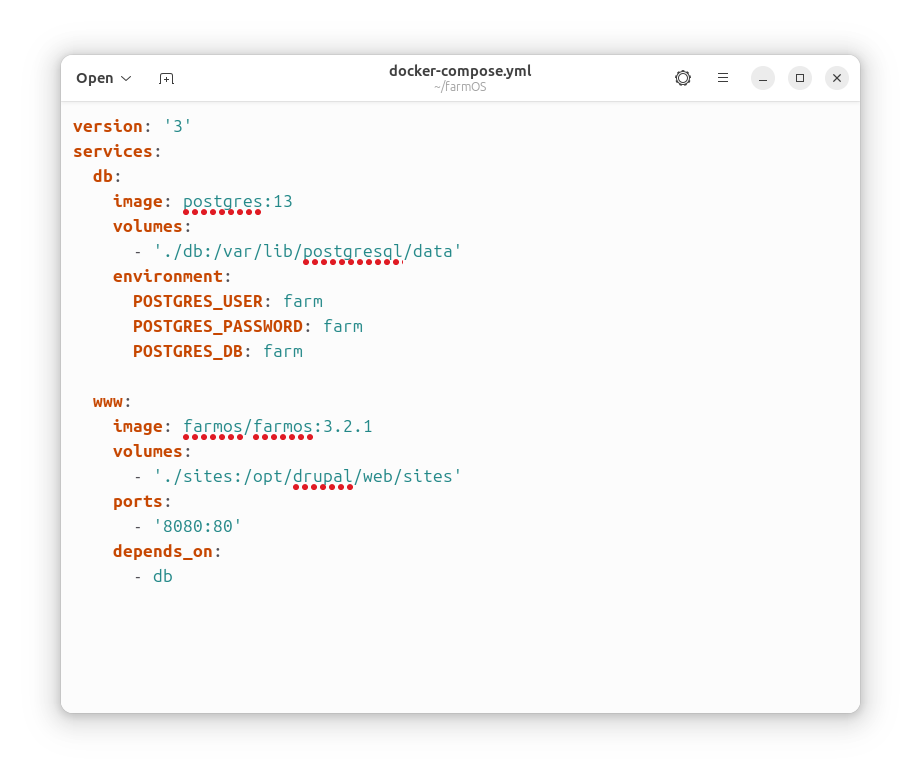
| [10:37:12] | <mstenta[m]> | First, you're going to add this in the `services` section, before the `www:` line:... (full message at <https://matrix.org/_matrix/media/v3/download/matrix.org/qZnaaxAeenLrrkGe...) |
| [10:37:35] | <mstenta[m]> | That will tell it to run a PostgreSQL 13 server in its own container alongside the farmOS container |
| [10:37:54] | <mstenta[m]> | So you'll have Apache+PHP+Drupal+farmOS in one container and PostgreSQL in another |
| [10:38:24] | <mstenta[m]> | You can add this to the `www` section, to ensure that the `db` starts first:... (full message at <https://matrix.org/_matrix/media/v3/download/matrix.org/bgsRSuWdoJBcNekX...) |
| [10:38:52] | <mstenta[m]> | And lastly, change �x.y.z� to �3.2.1� |
| [10:40:21] | <mstenta[m]> | Oh and maybe remove the �restart: always� |
| [10:40:42] | <mstenta[m]> | Should all look roughly like this when you're done:... (full message at <https://matrix.org/_matrix/media/v3/download/matrix.org/RCKuIvucYdhnXrSJ...) |
| [10:42:21] | <mstenta[m]> | (fwiw I was just saying to symbioquine that we might update our docs to include all this... so you're our guinea pig) :-) |
| [10:42:46] | <samno[m]> | ok, think im done there |
| [10:42:53] | <samno[m]> | fine by me! |
| [10:43:15] | <mstenta[m]> | ok - so from the command line, in your �farmOS� directory, run �sudo docker compose up� |
| [10:43:38] | <mstenta[m]> | you should see the terminal fill with log messages, it will basically stream the logs from PostgreSQL and Apache |
| [10:43:55] | <mstenta[m]> | Then go to http://localhost in your browser |
| [10:44:58] | <mstenta[m]> | (note: if you Ctrl + C in your terminal, it will shut down the containers. if you want this to run in the background you can add �-d� to the end like �sudo docker compose up -d� - then you'll be able to close the terminal window and it will still be running. but it's helpful to start it in the foreground this first time to make sure everything's working) |
| [10:45:11] | <mstenta[m]> | (you can view running containers in the future with �sudo docker ps�) |
| [10:45:29] | <mstenta[m]> | (or just �docker� without �sudo� if you set it up that way via Docker's instructions...) |
| [10:51:33] | <samno[m]> | ok, ive got the Apache 2 deafult page |
| [10:52:27] | <mstenta[m]> | hmm. you may have apache installed already in ubuntu... in which case there may be an error in your docker logs indicating that port 80 is already taken... do you see anything like that? |
| [10:53:10] | <mstenta[m]> | if so, Ctrl+C in your terminal to shut down the containers, edit �docker-compose.yml� and change �80:80� to �8080:80� and `docker compose up again... then open http://localhost:8080 in your browser |
| [10:53:44] | <samno[m]> | yes there is something like that |
| [10:53:50] | <mstenta[m]> | > `sudo apt install lamp-server^` |
| [10:53:50] | <mstenta[m]> | oh right... you did this earlier... so that's probably what's happening |
| [10:57:00] | <samno[m]> | ok yep, at the install page |
| [10:57:18] | <mstenta[m]> | great! |
| [10:57:37] | <mstenta[m]> | ok... so you can fix the 8080 / 80 issue later if you want (by uninstalling Apache from Ubuntu) |
| [10:57:46] | <mstenta[m]> | brb |
| [11:01:55] | <mstenta[m]> | ok so in the install form, plug in the following database options:... (full message at <https://matrix.org/_matrix/media/v3/download/matrix.org/CCOcyaJAeJDBAxDY...) |
| [11:02:41] | <samno[m]> | port number 5432 ok? |
| [11:03:02] | <mstenta[m]> | yep |
| [11:04:24] | <samno[m]> | Failed to connect to your database server. The server reports the following message: SQLSTATE[08006] [7] could not translate host name "db" to address: Temporary failure in name resolution. |
| [11:05:54] | <mstenta[m]> | Are you sure your �docker-compose.yml� is correct? the �db:� should be at the same indentation line as �www:�. The �db� name comes from there, and that's what allows other Docker containers to access it using that name. |
| [11:06:04] | <mstenta[m]> | You should also see PostgreSQL logs in the terminal. |
| [11:10:00] | <samno[m]> | �ACTION uploaded an image: (54KiB) < https://matrix.org/_matrix/media/v3/download/matrix.org/YygWFokgLRvdSRGJ... >� |
| [11:11:35] | <mstenta[m]> | can you share your terminal logs? maybe stick them in a private/temporary https://pastebin.com/ |
| [11:15:11] | <samno[m]> | https://pastebin.com/dDJk2pTM |
| [11:15:56] | <mstenta[m]> | OK yea the datasbase container is failing... |
| [11:16:15] | <mstenta[m]> | Are you running as �sudo�? |
| [11:16:54] | <samno[m]> | i think so |
| [11:17:08] | <mstenta[m]> | Do you see a �db� directory next to �docker-compose.yml�? |
| [11:17:15] | <mstenta[m]> | (Along with a �sites� directory) |
| [11:17:21] | <samno[m]> | yes |
| [11:17:40] | <mstenta[m]> | Can you run �ls -al db� and share the results? |
| [11:19:09] | <samno[m]> | as in tyoe it in the terminal? do i need to stop the current process? |
| [11:19:37] | <mstenta[m]> | yes |
| [11:20:21] | <samno[m]> | permission denied] |
| [11:20:34] | <mstenta[m]> | �sudo ls -al db� |
| [11:21:16] | <samno[m]> | total 80... (full message at <https://matrix.org/_matrix/media/v3/download/matrix.org/rDhKngkYRhoxrbZO...) |
| [11:22:11] | <mstenta[m]> | hmm. not sure what's wrong. but this is showing in your terminal log...... (full message at <https://matrix.org/_matrix/media/v3/download/matrix.org/oPzdqdQgyNDOUkhN...) |
| [11:22:21] | <mstenta[m]> | So what I would suggest is �sudo rm -rf db� |
| [11:22:27] | <mstenta[m]> | And then try �sudo docker compose up� again |
| [11:23:39] | <mstenta[m]> | A little explanation: Docker containers are "ephemeral" which means they don't persist any data you put in them by default. So eg if you created a PostgreSQL container, added data to it, then shut it down and restarted the container all that data is lost. The way to persist it is to mount a "volume" from outside of the container. In this case, that's the �db� folder. |
| [11:23:45] | <samno[m]> | ok yep, were on to configuring site now |
| [11:23:51] | <mstenta[m]> | So the �db� folder will container your database. |
| [11:24:24] | <mstenta[m]> | And the �sites� folder will contain things necessary to persist farmOS data like �settings.php� and any files/photos you upload. |
| [11:24:38] | <mstenta[m]> | So those two directories are where all your data is. Don't lose them! |
| [11:24:40] | <mstenta[m]> | :-) |
| [11:24:42] | <mstenta[m]> | Great! |
| [11:24:47] | <samno[m]> | cool |
| [11:25:13] | <mstenta[m]> | You �could� just backup both of those directories to make backups. But ALWAYS shut down your containers first. |
| [11:25:35] | <mstenta[m]> | Because PostgreSQL needs to write pending data to the directory during it's shutdown process. |
| [11:26:06] | <mstenta[m]> | The other way to make backups is to export a database snapshot as a �*.sql� file. |
| [11:26:32] | <mstenta[m]> | That's done using a tool like �pg_dump�, and is run while the container is running |
| [11:27:16] | <samno[m]> | ok i think that makes sense! |
| [11:27:31] | <mstenta[m]> | But a very simple backup procedure might be a simple script like this:... (full message at <https://matrix.org/_matrix/media/v3/download/matrix.org/jKYutqcVMnbdUlsl...) |
| [11:27:47] | <samno[m]> | Ill make a note of that! |
| [11:27:50] | <mstenta[m]> | that shuts down the containers, makes a �backup.tar.gz� file with �db� and �sites� in it, and then starts the containers again |
| [11:28:00] | <mstenta[m]> | be sure to test that... it's just off the top of my head :-) |
| [11:28:35] | <mstenta[m]> | also a good idea to include the data and/or farmOS version number in the tarball filename, like �backup-3.2.1-20240508.tar.gz� |
| [11:28:52] | <mstenta[m]> | that way, when you are updating to a new version of farmOS, if you run into any issues, you can roll back easily |
| [11:29:25] | <mstenta[m]> | that's the basic! you're on track now! |
| [11:29:30] | <mstenta[m]> | s/basic/basics/ |
| [11:30:01] | <mstenta[m]> | symbioquine am I overlooking anything? |
| [11:30:14] | <mstenta[m]> | here is how to update farmOS: https://farmos.org/hosting/update/ |
| [11:30:38] | <samno[m]> | great! many thanks for your perseverance and help |
| [11:30:39] | <mstenta[m]> | it's important to take a backup before updating... and to run �update.php� and rebuild caches after updating (all described in detail on that page) |
| [11:31:03] | <mstenta[m]> | lastly, join the forum! https://farmOS.discourse.group :-) |
| [11:32:05] | <samno[m]> | thanks, im on the forum but i figured I needed one to one help more so than starting a topic there! |
| [11:32:49] | <mstenta[m]> | yea this chat is better for that kind of stuff - forum is better for longer discussions |
| [12:00:01] | <symbioquine[m]> | <mstenta[m]> "symbioquine am I overlooking..." <- No, I think as long as you bring the database down first, that's a good strategy... |
| [12:00:57] | <symbioquine[m]> | It might even work okay with the DB up - since the DB needs to be able to recover from power loss, but there could be situations where a larger write/import/etc was captured in a partially completed state. |
| [12:01:50] | <mstenta[m]> | Yea true |
| [16:48:05] | <mstenta[m]> | symbioquine paul121 TIL `version` is no longer recommended in `docker-compose.yml` files |
| [16:48:06] | <mstenta[m]> | https://github.com/farmOS/farmOS/pull/845 |
| [16:48:59] | <mstenta[m]> | https://github.com/docker/compose/issues/11628 |
| [18:04:01] | <farmBOT> | @farmOS@fosstodon.org => #farmOS is approaching 1000 stars on GitHub! Help us get there! https://github.com/farmOS/farmOS/ => https://fosstodon.org/@farmOS/112407352555091160 |